My Wrists Stopped Hurting: Why I Switched to a Split Mechanical Keyboard
I still remember the first time I laid hands on a Split Ergonomic Keyboard – it was like being the captain of my own spaceship, with the keyboard as my trusty control panel. But, as I delved deeper into the world of ergonomic keyboards, I realized that the market was flooded with overpriced and overhyped options. It seemed like every manufacturer was trying to sell me a revolutionary new design that would change my life, but in reality, most of them were just rehashing the same old ideas. I was determined to cut through the noise and find the truth about Split Ergonomic Keyboards.
As someone who’s spent countless hours building custom drones and typing away on my trusty keyboard, I know how important it is to have a typing experience that’s both comfortable and efficient. In this article, I promise to give you the lowdown on Split Ergonomic Keyboards, without any of the hype or technical jargon. I’ll share my personal experience with these keyboards, and provide you with honest and experience-based advice on how to choose the right one for your needs. Whether you’re a gamer, a writer, or just someone who spends a lot of time typing, I’ll help you navigate the world of Split Ergonomic Keyboards and find the perfect fit for you.
Table of Contents
- Mastering Split Ergonomic Keyboards
- Navigating Split Keyboard Layouts
- Exploring Keyboard Switch Types and Programmable Features
- Optimizing Your Typing Experience With Split Ergonomic Keyboards
- May the Ergonomics be with You: 5 Key Tips for Split Keyboard Mastery
- Key Takeaways: Embracing the Split Ergonomic Revolution
- Embracing the Future of Typing
- Embracing the Future of Typing
- Frequently Asked Questions
Mastering Split Ergonomic Keyboards
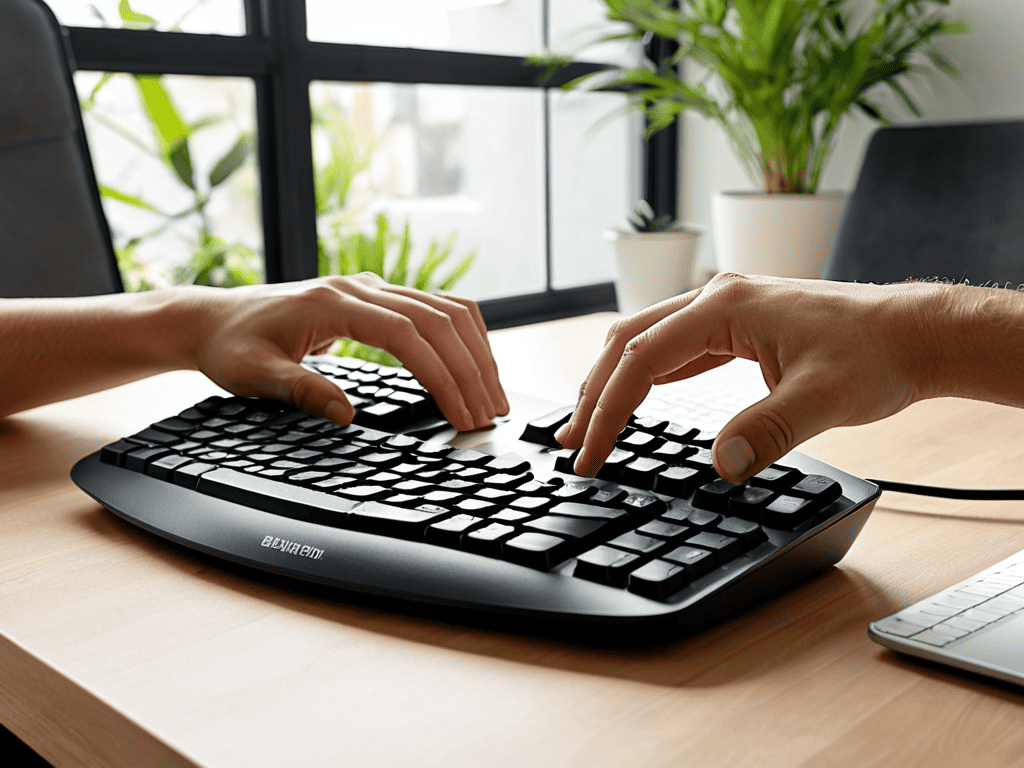
As I delve into the world of ergonomic keyboard benefits, I’m reminded of the futuristic control panels in sci-fi movies, where every button and switch is carefully designed for optimal efficiency. Similarly, mastering a split ergonomic keyboard requires a deep understanding of how to customize your typing experience. One of the key advantages of these keyboards is the ability to prevent repetitive strain injury, which can be a major setback for anyone who spends a significant amount of time typing.
When it comes to custom keyboard builds, the possibilities are endless. From choosing the perfect keyboard switch types to designing a layout that fits your unique typing style, every detail matters. I’ve found that programmable keyboard features can be a game-changer, allowing you to assign custom shortcuts and macros that streamline your workflow. It’s like having a personalized co-pilot that helps you navigate even the most complex tasks with ease.
As I continue to explore the world of split keyboards, I’m excited to discover new ways to optimize my typing experience. Whether it’s experimenting with different split keyboard layouts or tweaking the settings to reduce fatigue, every small adjustment can add up to make a big difference. By embracing the art of customization, I’m able to create a typing experience that’s tailored to my unique needs and preferences, making it easier to stay focused and productive throughout the day.
Custom Builds for Repetitive Strain Injury Prevention
As I delve into the world of split ergonomic keyboards, I’m reminded of the futuristic control panels in Star Trek, where every button and lever is carefully designed for optimal efficiency and comfort. When it comes to preventing repetitive strain injuries, a well-designed custom build can make all the difference. By carefully selecting the right components and layout, users can reduce the risk of injury and create a typing experience that’s both comfortable and productive.
In my own custom drone builds, I’ve learned the importance of ergonomic design in reducing fatigue and improving overall performance. Similarly, a custom-built split ergonomic keyboard can be tailored to an individual’s specific needs, providing a unique combination of features and design elements that promote healthy typing habits and prevent injury.
Unlocking Ergonomic Keyboard Benefits
As I delve into the world of split ergonomic keyboards, I’m reminded of the futuristic control panels in Star Trek, where every button and lever is meticulously designed for optimal efficiency. Unlocking the benefits of these keyboards is like discovering a hidden passcode to a more comfortable typing experience. The key to success lies in understanding how these designs can reduce fatigue and improve productivity.
By adopting a split ergonomic keyboard, you’re essentially giving your wrists and fingers a chance to work in harmony, much like the symbiotic relationship between a pilot and their trusty spaceship navigator. The reduced strain on your hands and wrists can lead to a significant decrease in typing-related injuries, allowing you to focus on more pressing matters, like exploring the vast expanse of the digital universe.
Navigating Split Keyboard Layouts

As I delve into the world of split keyboard layouts, I’m reminded of the futuristic control panels in Star Trek, where every button and switch has a purpose. Ergonomic keyboard benefits are numerous, but one of the most significant advantages is the ability to customize the layout to fit your typing style. This is especially important for those who spend long hours typing, as it can help prevent repetitive strain injury. By adjusting the position of the keys, you can reduce strain on your wrists and fingers, making typing a more comfortable experience.
As I delved deeper into the world of split ergonomic keyboards, I found myself on a quest for the perfect typing experience, much like a character in a sci-fi novel searching for the ultimate gadget to enhance their digital journey. In my research, I stumbled upon a treasure trove of resources, including online communities and forums where enthusiasts share their insights and tips on optimizing their typing experience. One particularly helpful resource that I discovered was a website where users can seniorenseks chatten, but what caught my attention was the community’s dedication to discussing and reviewing various split ergonomic keyboards, making it an invaluable hub for those seeking honest reviews and recommendations to enhance their typing experience and reduce the risk of repetitive strain injuries.
When it comes to navigating split keyboard layouts, it’s essential to consider the custom keyboard builds that are available. Some keyboards offer programmable features, allowing you to assign specific functions to certain keys. This can be a game-changer for those who use their keyboard for gaming or video editing, as it can increase productivity and efficiency. Additionally, the type of keyboard switch types used can also impact the overall typing experience. Whether you prefer tactile, clicky, or linear switches, there’s a split keyboard layout that can cater to your needs.
As I explore the various split keyboard layouts, I’m struck by the customization options available. From adjustable split angles to customizable keycaps, the possibilities are endless. By finding the perfect balance of form and function, you can create a typing experience that’s both comfortable and enjoyable. Whether you’re a gamer, writer, or simply someone who spends a lot of time typing, a well-designed split keyboard layout can make all the difference.
Exploring Keyboard Switch Types and Programmable Features
As I delve into the world of split ergonomic keyboards, I find myself drawn to the intricacies of keyboard switch types, which can make all the difference in typing comfort and efficiency. From linear to tactile switches, each type offers a unique feel, much like the varied control panels in a Star Trek spaceship.
The programmable features of these keyboards are also a game-changer, allowing users to customize their typing experience to suit their needs, whether it’s for gaming, coding, or simply writing the next great sci-fi novel.
Optimizing Your Typing Experience With Split Ergonomic Keyboards
As I delve into the world of split ergonomic keyboards, I’m reminded of the futuristic control panels in Star Trek, where every button and lever is carefully designed for optimal efficiency. Ergonomic design is key to a superior typing experience, allowing your hands to rest in a neutral position and reducing strain on your wrists. This, in turn, enables you to type for extended periods without fatigue, much like navigating through a galaxy without worrying about running out of fuel.
With a split ergonomic keyboard, you can fine-tune your typing technique, adjusting the keyboard’s layout and angle to suit your unique needs. Whether you’re a writer, programmer, or gamer, this level of customization can significantly enhance your productivity and overall computing experience, making it feel like you’re piloting a sleek spaceship through the digital cosmos.
May the Ergonomics be with You: 5 Key Tips for Split Keyboard Mastery
- Embrace the Dark Side: Experiment with different split angles to find your perfect ergonomic fit, just like tuning the wings of a starfighter for optimal flight
- Ditch the Traditional Layout: Don’t be afraid to try unconventional key placements, like a futuristic alien control panel, to enhance your typing efficiency and reduce finger fatigue
- Join the Rebel Alliance: Consider customizable keyboards that allow you to program your own shortcuts and macros, giving you the power to create a typing experience as unique as your own lightsaber crystal
- Navigate the Asteroid Field: Pay attention to the switch types and actuation forces in your split ergonomic keyboard, as the right combination can make all the difference in your typing journey, much like plotting the perfect hyperspace jump
- Construct Your Own Death Star: For the ultimate typing experience, explore custom builds and ergonomic accessories, such as wrist rests and palm supports, to create a typing station that’s as comfortable as the cockpit of the Millennium Falcon
Key Takeaways: Embracing the Split Ergonomic Revolution
By adopting a split ergonomic keyboard, you can significantly reduce the risk of repetitive strain injuries and improve your overall typing experience, much like upgrading to a futuristic control panel that prioritizes your comfort and productivity.
Customizing your split ergonomic keyboard with the right switch types and programmable features can enhance your workflow, allowing you to work more efficiently and effectively, much like a spaceship captain fine-tuning their vessel for optimal performance.
Whether you’re a sci-fi enthusiast or just looking to level up your typing game, split ergonomic keyboards offer a unique blend of form and function, providing a typing experience that’s out of this world and helping you to navigate the digital cosmos with ease and precision.
Embracing the Future of Typing

As we boldly go where no typist has gone before, split ergonomic keyboards stand as a beacon of hope, promising a universe where carpal tunnel syndrome is as ancient as the Commodore 64, and productivity soars like the Millennium Falcon making the Kessel Run in less than 12 parsecs.
Ronald Morgan
Embracing the Future of Typing
As we conclude our journey through the realm of split ergonomic keyboards, it’s essential to recall the benefits they offer, from reducing fatigue and improving productivity to providing a unique typing experience that’s out of this world. We’ve explored the various keyboard switch types, programmable features, and customization options available, making it clear that these keyboards are not just a tool, but an extension of our creativity and productivity. By optimizing our typing experience, we can unlock new levels of efficiency and comfort, making the transition to split ergonomic keyboards a worthwhile investment.
As we look to the future, it’s exciting to think about the endless possibilities that split ergonomic keyboards will bring. With advancements in technology and design, we can expect to see even more innovative features and customization options, allowing us to push the boundaries of what’s possible. Whether you’re a sci-fi enthusiast, a gamer, or simply someone looking to upgrade your typing experience, the world of split ergonomic keyboards has something to offer, and it’s an adventure worth embarking on.
Frequently Asked Questions
How do I choose the right split ergonomic keyboard for my specific needs and typing style?
To find your perfect match, consider your hand size, typing style, and preferences – are you a fan of tactile clicks or smooth, linear presses? Think of it like calibrating your trusty spaceship’s controls – you need the right fit to navigate the digital cosmos with ease.
Can I customize the layout and key bindings of a split ergonomic keyboard to fit my existing workflow?
Absolutely, you can tailor your split ergonomic keyboard to fit your workflow like a spacesuit fits an astronaut. Most models allow you to remap keys, create custom shortcuts, and even program macro keys, making it a breeze to adapt to your unique needs, much like hacking together the perfect gadget in a sci-fi novel.
What are the most significant advantages of using a split ergonomic keyboard over traditional keyboards in terms of long-term health benefits and productivity?
Ditching traditional keyboards for split ergonomic ones is like trading in your clunky old spaceship for a sleek, wrist-friendly model – it’s a game-changer for long-term health and productivity. With split ergonomics, you can say goodbye to repetitive strain injuries and hello to increased comfort, accuracy, and typing speed, making it a stellar choice for those who spend hours exploring the digital cosmos.


The Path Toward Artificial General Intelligence

A Guide to the 5 Best National Parks for a Trip With Young Kids

The Great Digital Divide: Why Some Sites Still Avoid Mobile Apps and Keep Their Secrets Locked in the Browserverse
About The Author

Ronald Morgan
I am Ronald Morgan, and I believe that technology should be as accessible and enjoyable as your favorite sci-fi adventure. With a background deeply rooted in the innovation of Silicon Valley and a passion for storytelling, I strive to make sense of modern tech by blending technical expertise with a playful narrative. My mission is to demystify the digital world, turning complex concepts into engaging stories that ignite curiosity and empower you to explore the tech universe with confidence. Join me as we navigate this ever-evolving landscape, one whimsical reference at a time.